


| Quantity: | |
|---|---|


>> Introduction
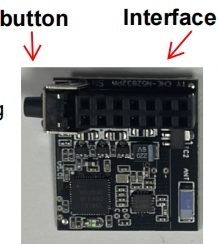
The module adopts a plug-and-play design, requiring no complex wiring or renovation. It can be used directly by simply plugging into the dedicated interface of the main control board. It supports up to 50 user authorization sharing and intelligent eco-system full-scene linkage, and can be interconnected with smart locks, cameras, lights and other devices. It offers a one-year whole machine warranty and lifetime online technical support. It is a cost-
effective choice for the intelligent upgrade of access control systems in places such as villas, residential communities, and enterprise parks.

(3).app will generate an icon on the mobile desktop after installation
Note

FAQ
1. How to download the corresponding APP?
There are two methods:
• Scan the QR code on the packaging box or the instruction manual directly to download
• Search for "Smart Life" (Intelligent Life) in the Apple App Store or the Android app market to download and install
2. What should be noted for the first pairing?
Before the first pairing, you must restore the factory settings first:
1. Plug the Bluetooth module into the dedicated interface of the door control panel
2. Press and hold the setting button on the side of the module for more than 5 seconds until the indicator light starts to flash rapidly
3. Open the Smart Life APP, click the "+" sign on the top right corner to select "Add Device"
4. The APP will automatically search for the nearby Bluetooth module, click "Add" and follow the prompts to complete the configuration
3. Can the sensing distance be adjusted?
OK. In the device settings interface of the APP, you can freely adjust the sensing distance within the range of 5 to 30 meters according to your actual needs, to avoid false triggering due to excessive distance.


