
Views: 0 Author: Site Editor Publish Time: 2026-01-27 Origin: Site


Have you ever tried to add a new remote, only to find your gate opener won’t respond? For many homeowners and installers, programming a gate opener feels confusing at first, especially when working with different models or control boards. Learning how to program a gate opener is an essential skill for anyone using automated access systems. Whether you are replacing an old remote or setting up a new installation, proper programming helps ensure smooth operation, reliable access, and long-term stability.
In this article, you will learn a clear, step-by-step process to program your gate opener. We’ll cover remote pairing, control board settings, and practical tips that work across most modern gate systems.
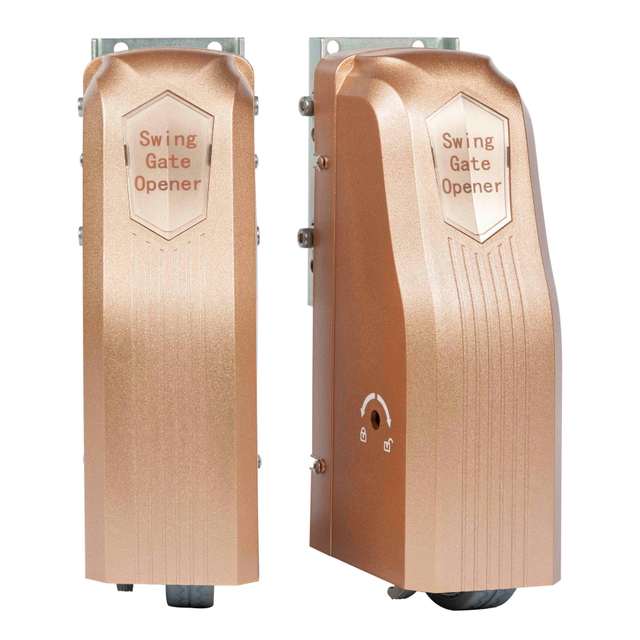
Start by identifying your gate opener type. Common systems include swing gates, sliding gates, underground operators, and barrier arms. Each moves differently, but their programming methods remain largely similar.
Next, determine whether your remote uses fixed-code or rolling-code technology. Fixed-code remotes rely on matching dip switches, while rolling-code remotes use a Learn button on the receiver. Compatibility matters here—using the wrong remote type is one of the most common reasons programming fails.
Remote Type | Identification | Programming Method | Typical Use |
Fixed Code | Dip switches inside remote | Match switch pattern | Older systems |
Rolling Code | Learn/Program button | Pair electronically | Modern systems |
Open the control box near the gate motor and locate the main control board. Most gate opener systems label the programming button as “Learn,” “Program,” or “CH1/CH2.” You will also see an LED indicator nearby that flashes or lights up when the system enters pairing mode.
Many modern designs—including OMKER sliding and swing gate operators—place this button directly on the PCB for easy access during installation and maintenance.
Before touching anything, take a quick photo of the wiring layout. This simple step helps prevent mistakes later.
Press and hold the Learn button until the indicator light changes state. Some models blink rapidly, while others stay solid. This signals that your gate opener is ready to accept a new remote.
Most systems only stay in learning mode for about 10–20 seconds. If nothing happens, the unit exits automatically, and you will need to repeat the process.
While the control board is in programming mode, press the button on your remote that you want to use. Hold it for two to three seconds, then release. The LED will usually flash again or the unit will beep, confirming that the remote has been stored.
If you need to add multiple remotes, repeat this process for each one individually.
Tip: Always install fresh batteries before programming. Weak batteries often cause incomplete pairing.
Once pairing is complete, test the remote from a safe distance. Open the gate, close it, and observe the movement. The gate should travel smoothly, stop at the correct limits, and respond consistently.
If your gate opener includes safety sensors or soft-start features, verify those as well. A simple cardboard test can confirm obstacle detection.
After testing, allow the system to exit programming mode automatically or press the Learn button again if required.
In many modern gate opener systems, it is possible to program a new remote using an existing working remote, without opening the control box. This feature is especially useful for property managers and installers who need to add user access quickly on site. However, this method only works when both remotes are compatible and the original remote is fully functional.
Remote cloning usually works on rolling-code or clone-capable systems. The existing remote must already control the gate opener, and the new remote must match its frequency and protocol. Before starting, replace batteries in both remotes and confirm stable signal performance.
Remote cloning follows a simple sequence. After activating clone mode on the new remote, both devices exchange signals at close range. The table below outlines the standard process.
Step | Action | Expected Result |
1 | Activate clone mode on the new remote until the LED starts flashing | New remote enters learning state |
2 | Place both remotes facing each other, about one to two inches apart | Stable signal connection |
3 | Press and hold the active button on the original remote | New remote receives the code |
4 | Watch for the LED light change on the new remote | Confirms successful transfer |
5 | Test the new remote immediately | Gate responds correctly |
Perform cloning away from metal surfaces or electrical equipment, and keep both remotes steady during programming. Weak batteries often cause incomplete pairing, so battery condition matters. After cloning, test both remotes at normal distance to confirm stable response.
Note: When possible, follow cloning with standard Learn-button pairing. This allows the gate opener to store the remote directly and improves long-term reliability.
Fixed-code systems use physical dip switches inside both the remote and receiver. Programming simply involves matching these switch positions. If you want a new access code, change the pattern on both devices.
These systems are straightforward but require careful documentation when managing multiple users.
Rolling-code systems are more common today. They use electronic pairing through the Learn button and generate new codes automatically. This improves signal stability and reduces interference.
Many newer gate opener systems, including OMKER’s linear arm and crank arm operators, use rolling-code receivers for residential and commercial applications.
Good preparation saves time and prevents errors.
● Manufacturer manual
● Remote controls with fresh batteries
● Small screwdriver set
● Ladder and safety gloves
● Optional multimeter for power checks
Item | What to Check | Status |
Power supply | Stable voltage | OK |
Antenna | Secure connection | OK |
Remote batteries | Full charge | OK |
Model number | Matches remote | OK |
Professional manufacturers like OMKER emphasize preparation because correct setup directly impacts long-term performance.
Swing gate openers require accurate travel limit settings so the gate opens and closes fully without overrun. For dual-leaf systems, both sides must be synchronized to prevent uneven movement or mechanical stress. After programming, run several test cycles to confirm consistent motion.
Sliding gate openers depend on proper track limits and balanced motor force. Set the open and close positions to match the physical end points of the rail, then adjust motor force so the gate moves smoothly without excessive pressure. Always test obstacle detection after setup.
Underground and barrier gate systems focus more on timing and safety alignment. Opening delays, closing speed, and safety sensors should be checked carefully during programming. Because these systems are harder to access later, accurate calibration at this stage is especially important.
Gate Type | Main Adjustment | Secondary Check | Programming Goal |
Swing Gate | Travel limits | Dual-leaf sync | Smooth open / close |
Sliding Gate | Track limits | Motor force | Balanced movement |
Underground / Barrier | Timing alignment | Safety sensors | Stable operation |
Many vehicles allow gate opener remotes to be paired directly with built-in dashboard buttons, providing convenient hands-free access.
Place your vehicle into pairing mode following the car manufacturer’s instructions, then hold your handheld remote near the dashboard controls and press the desired button until the vehicle confirms synchronization. If memory is full, clear existing entries before adding new ones.
Vehicle pairing works best under stable signal conditions. Before starting, choose a suitable environment and be ready to repeat the process if needed.
● Program in an open area, away from metal surfaces or electrical equipment.
● If pairing fails, reset the vehicle system and restart the process from the beginning.
Most gate opener systems allow you to clear all stored remotes by holding the Learn button for 10–15 seconds until the indicator light changes. This reset removes previous access settings and prepares the system for new pairing. After resetting, reprogram remotes starting with the primary administrator device, then add secondary users as needed.
For shared properties, group remotes by users and remove temporary access once projects are complete. Assign permanent remotes to long-term users and keep short-term access limited. Keeping a simple record of assigned remotes also helps simplify future updates and reduces confusion during maintenance.
Learning how to program a gate opener is simpler than it seems. With clear steps and basic preparation, we can pair remotes, test movement, and restore access fast. By identifying system type, entering programming mode, and completing on-site checks, homeowners and installers improve reliability while reducing future maintenance.
Manufacturers like Fujian Omker Intelligent Technology Co., Ltd. deliver sliding and swing gate openers designed for smooth control, stable performance, and easy setup, helping projects run efficiently and adding long-term value.
A: Programming a gate opener means pairing your remote with the control board so it can open and close the gate correctly.
A: Most systems use a Learn or Program button. Press it, then press your remote button until the gate opener confirms pairing with a light or beep.
A: Common reasons include weak batteries, incompatible remotes, or exiting learning mode too soon. Always check your gate opener model before pairing.
A: Fixed-code systems use dip switches, while rolling-code gate opener models pair electronically and provide better signal stability.
A: DIY programming is usually free. Professional service costs vary by system type and location (price needs verification).
A: No special tools are required for most gate opener setups—fresh batteries and access to the Learn button are usually enough.


